
Jet Black
A bold, glossy blue-black that delivers maximum depth and drama, flattering cool and neutral skin tones with striking contrast.
Hair Color try-on · 20 presets
Upload your photo and preview one of 20 hair colors before dyeing. The color presets ask AI to recolor your hair while retaining your current cut. Browsing is free; generating previews uses paid try-ons, with one-time packs from $4.99.
Last updated:
Choose a clear, front-facing photo with visible hair and even lighting. On desktop, use “Send photos from your phone” to scan a QR code and send a photo to the uploader.
Open the Hair Color tab in the homepage generator. Choose a preset, or select up to 5 styles to compare on the same photo.
Use a paid try-on pack to generate your selected looks. Each successful result uses one try-on; failed or blocked results do not use one.
Review the results together and download the shades you want to keep. Save them promptly: history downloads are available for 24 hours after creation.
Start with a color family, then open a shade for its reference image and description. Caramel Balayage is grouped with browns because it uses a brown base; Strawberry Blonde is grouped with blondes.
Every shade on this page is one of the 20 presets in the Hair Color category of the AI Haircut generator, counted on November 15, 2026. Families are grouped by shade name (Caramel Balayage counts with browns, Strawberry Blonde with blondes). Hex codes are the catalog's reference values, not exact dye matches.
Swipe the table sideways to see each hex code, family and try link.
| Color name | Swatch | Hex code | Color family | Try on your photo |
|---|---|---|---|---|
| Jet Black | #0B0B0D | Natural browns & blacks | Try this color → | |
| Dark Brown | #3B2417 | Natural browns & blacks | Try this color → | |
| Chestnut Brown | #6B4226 | Natural browns & blacks | Try this color → | |
| Ash Brown | #6F6459 | Natural browns & blacks | Try this color → | |
| Caramel Balayage | #A9743F | Natural browns & blacks | Try this color → | |
| Honey Blonde | #C99A4E | Blondes | Try this color → | |
| Platinum Blonde | #EAE3D2 | Blondes | Try this color → | |
| Copper Ginger | #B4531F | Reds & coppers | Try this color → | |
| Auburn | #7E3417 | Reds & coppers | Try this color → | |
| Burgundy | #5C1A2B | Reds & coppers | Try this color → | |
| Rose Gold | #C88E82 | Fantasy pastels & brights | Try this color → | |
| Silver Grey | #B8BCC0 | Greys | Try this color → | |
| Pastel Pink | #E4B7C7 | Fantasy pastels & brights | Try this color → | |
| Lavender Purple | #B497D6 | Fantasy pastels & brights | Try this color → | |
| Baby Blue | #A9CCE3 | Fantasy pastels & brights | Try this color → | |
| Teal Green | #1FA69A | Fantasy pastels & brights | Try this color → | |
| Peach | #F5B183 | Fantasy pastels & brights | Try this color → | |
| Strawberry Blonde | #D98E5A | Blondes | Try this color → | |
| Mushroom Brown | #8B7D6F | Natural browns & blacks | Try this color → | |
| Cherry Red | #B01B2E | Reds & coppers | Try this color → |
Reference images and shade notes come from each preset's catalog page. The skin-tone notes are styling suggestions, not a color-matching test.
A bold, glossy blue-black that delivers maximum depth and drama, flattering cool and neutral skin tones with striking contrast.
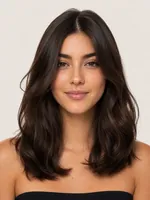
A rich espresso dark brown with warm neutral depth that suits most skin tones and adds soft, natural-looking dimension.

A warm, reddish medium brown with glossy chestnut richness that flatters warm and olive skin tones beautifully.
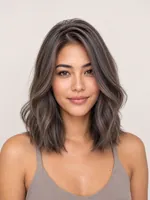
A cool-toned neutral brown with smoky ash undertones that mutes warmth and flatters fair to medium cool complexions.
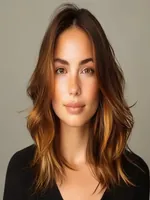
A sun-kissed brown base melting into golden caramel ribbons, adding warmth and dimension that flatters medium skin tones.
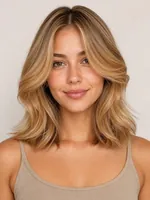
A warm golden honey blonde with luminous amber richness that brightens the complexion and flatters warm skin tones.
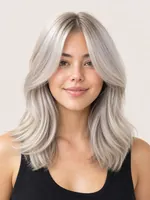
An icy, near-white platinum blonde with cool silvery undertones that makes a bold statement on fair, cool complexions.
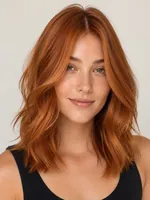
A vibrant, fiery copper ginger with radiant warm orange tones that flatter warm, freckled, and fair complexions.
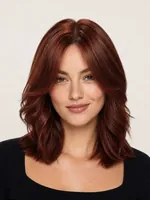
A deep reddish-brown auburn balancing rich brown depth with warm red tones, flattering warm and neutral complexions.
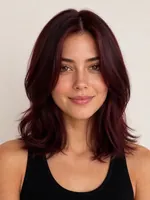
A deep wine-red burgundy with luxurious purple-red undertones that makes a bold, elegant statement on cool and neutral tones.
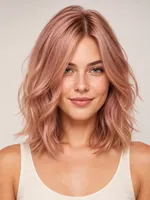
A soft, romantic rose gold blending blush pink with warm gold, flattering fair to medium skin with a modern pastel glow.
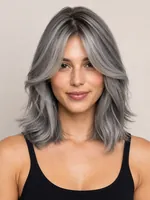
A chic metallic silver grey with cool smoky undertones that delivers a modern, high-fashion look on cool complexions.
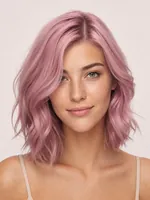
A soft, dusty pastel pink that washes hair in a delicate rose-tinted hue, romantic and whimsical while flattering fair to medium skin tones.
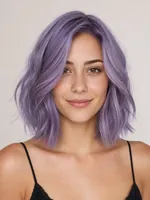
A cool, muted lavender purple that wraps hair in soft violet elegance, blending pastel softness with a mystical, whimsical edge.
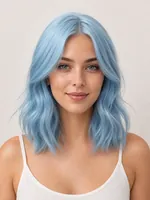
A light, airy baby blue that gives hair a fresh, sky-soft pastel finish for a cool and ethereal fashion-forward vibe.
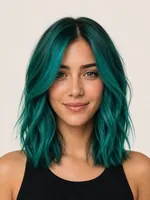
A rich, saturated teal green blending blue and emerald tones for a bold, mermaid-inspired look with striking oceanic depth.
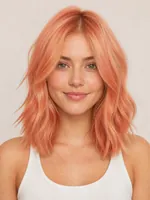
A warm, soft peach that blends pastel orange and pink for a sun-kissed, fruity glow with a fresh and flattering finish.
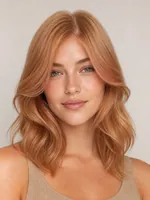
A warm strawberry blonde that fuses soft golden blonde with a rosy red-copper tint for a natural, radiant, sun-warmed glow.
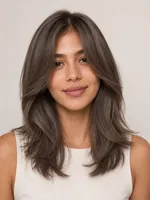
A muted, ashy mushroom brown blending cool taupe and greige tones for a modern, sophisticated, and low-maintenance neutral look.

A bold, glossy cherry red with deep crimson richness and a vivid, juicy finish for a striking, high-impact statement look.
The color prompts request a new shade, including its undertones, dimension and shine. They ask for a natural-looking change to the hair while preserving your face, skin tone, lighting and background. Every color preset also tells the AI to keep your existing haircut, length and texture unchanged, so you see a new color rather than a new cut.
These are instructions to AI, not a guarantee that every detail stays identical. Check your hairline, texture and face in the output. Use an evenly lit photo without a strong color filter, and keep your hair visible rather than hidden by a hat. The AI preview is a visual reference, not a guarantee of a salon result.
Choose 2 or 3 shades on the same photo and compare the results side by side. The generator accepts up to 5 selected styles, with one try-on used per successful result. Compare how warm and cool tones look beside your face, then download your favorites to discuss with your colorist.
An image cannot tell you what dye process your hair needs. A drastic change such as dark hair to platinum may require bleaching; ask your colorist what is achievable from your starting color and hair history.
For a dimensional color preview, Caramel Balayage requests a medium brown base with golden caramel highlights, concentrated toward the mid-lengths and ends, and a gradual blend from darker roots. It is one of the 20 color presets.
Ombre Waves is a separate preset in the Long Hair category, combining a brunette-to-blonde gradient with soft waves. It can change the hairstyle as well as the color. These are preset looks; there is no editor for painting individual highlights or placing an ombre transition yourself.
Browsing colors is free. Generating a preview requires a paid, one-time pack with no subscription. Try-ons are valid for 365 days. Buying a pack pays for the balance; a try-on is deducted only when your result is ready. Failed or blocked results do not use a try-on.
Prices are in USD as of November 15, 2026; tax may be added at checkout. See pricing and pack details.
Uploaded originals are automatically deleted from our storage 30 days after upload. Our stored copies of generated previews are deleted 30 days after creation. Photos use unlisted, long random links; anyone with a photo link can view it. Your photo is sent to AI providers for preview generation and content checks, and their storage rules are separate. We do not sell your photos.
The phone upload link expires after 15 minutes; that does not delete the stored photo. History downloads are available for 24 hours after creation. Read the photo storage and privacy policy for details.
All 20 color presets tell the AI to recolor the hair and keep your existing haircut, length and texture unchanged. AI can still alter details, so check each preview before treating it as a reference for your colorist.
You can select up to 5 styles for the same photo. Compare 2 or 3 shades to start, or select up to 5 colors. Each successful result uses one try-on.
Browsing the 20 colors is free. Generating a preview is paid: one-time packs start at $4.99 for 1 try-on. There is no subscription. A try-on is used only when a result is ready; failed or blocked results do not use one.
All 20 color presets are unisex. You can use a photo of short or long hair; choose a clear photo with your hair visible. The preview is intended to recolor the hair in your photo, rather than add a different haircut.
The Hair Color tab offers 20 presets. There is no custom color picker. The swatches and hex codes in the shade table identify catalog shades; they do not guarantee an exact dye or screen color match.
Upload a JPG, PNG or WebP image up to 10 MB. A clear, front-facing photo with your hair visible and even lighting works best. On a computer you can scan a QR code to send a photo from your phone; that link expires after 15 minutes.
Yes. Compare the generated results and use Download to save the previews you want to discuss with your colorist. History downloads are available for 24 hours after creation, so save your copies promptly.